
BUSINESS TELEPHONY INTEGRATION • ASSESSMENT • ROUTING • TESTING
FreePBX and Panasonic PBX Integration in Dubai, UAE
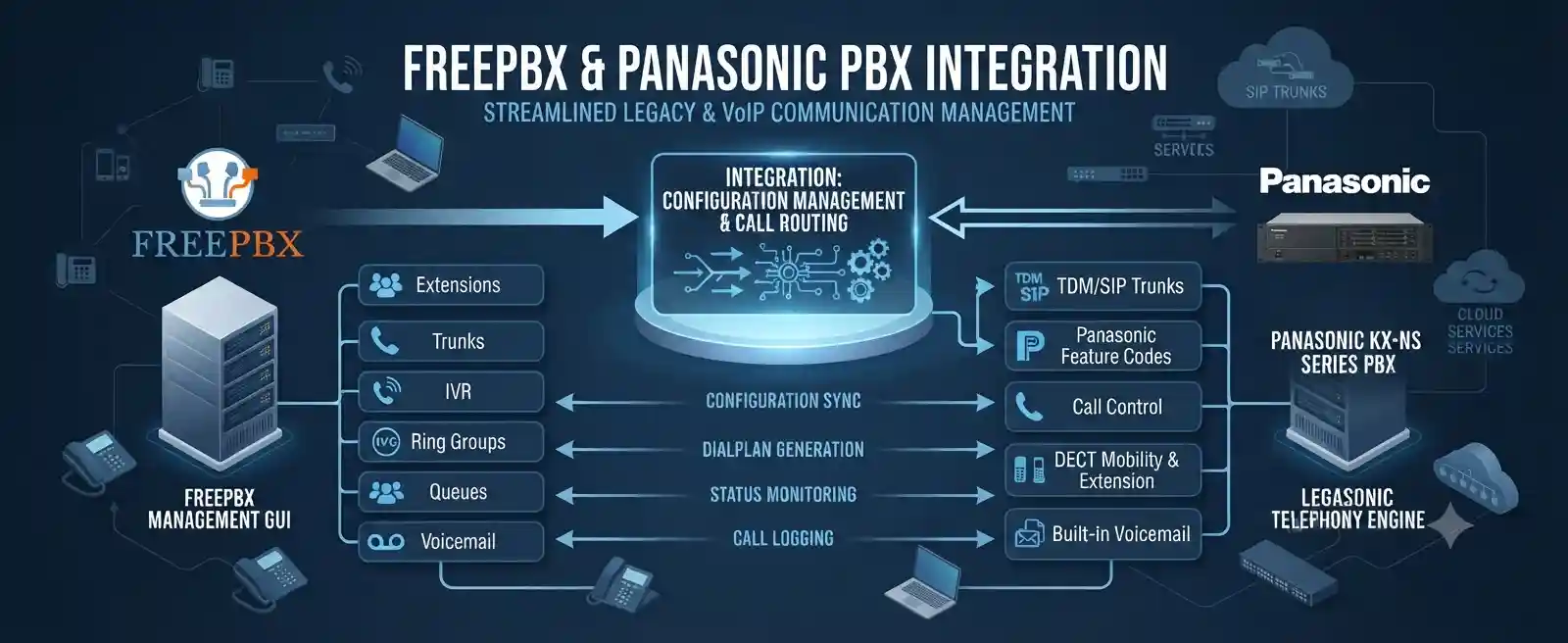
Integrating FreePBX with an existing Panasonic PBX can create a controlled bridge between a newer IP-based call platform and an established telephone environment. The work may support staged migration, selected extension groups, inter-PBX calling, centralised routing, branch communication, or a requirement to preserve existing Panasonic functions while introducing FreePBX. The correct method depends on the Panasonic model, firmware, licences, interfaces, network, current dial plan, and the business outcome required.
What does FreePBX and Panasonic PBX integration mean?
It means creating an authorised call path between a FreePBX system and a Panasonic PBX so that selected calls can pass between them according to an agreed dial plan. In suitable environments this may use SIP trunking between IP-capable systems; in other environments a gateway or a different interface may be required. Businesses consider this service when they want to retain part of an existing Panasonic telephone installation while adding FreePBX, connect separate extension ranges, prepare a staged migration, or simplify routing between locations. Before a scope can be confirmed, the Panasonic PBX model and firmware, FreePBX version, Asterisk channel configuration, network addressing, available interfaces, licences, extension ranges, inbound numbers, routing rules, codec requirements, security controls, and backup status should be reviewed.
What the integration service can cover
The service can cover discovery of both PBX environments, call-flow mapping, review of SIP or gateway options, extension and number planning, trunk configuration, inbound and outbound route design, caller-ID handling, codec and DTMF checks, firewall and NAT review, test calling, rollback planning, documentation, and administrator handover. Each item remains subject to the confirmed equipment and quotation.
Who may need this service
It may suit offices with a functioning Panasonic PBX that cannot be replaced in one step, organisations introducing FreePBX for a department or branch, businesses consolidating routing between separate telephone systems, and teams preparing a planned migration while keeping existing extensions available. It can also help when two systems already connect but calls fail, route incorrectly, lose caller information, produce one-way audio, or behave differently from the intended dial plan.
Why businesses integrate instead of replacing everything at once
A telephone system often sits across more business processes than the visible handsets suggest. Reception routing, hunt groups, analogue devices, fax lines, door phones, DECT coverage, lift or emergency interfaces, call recording, contact-centre functions, provider trunks, direct inward numbers, and staff habits may all depend on an existing PBX. Replacing every element at once can create unnecessary project risk when the business only needs a controlled change in one area.
A FreePBX and Panasonic PBX integration project can therefore be used as an intermediate architecture. One group of users may continue on Panasonic while another group moves to FreePBX. A branch may register to FreePBX but still reach legacy extensions through the Panasonic system. Selected external calls may be routed by one platform while internal extensions remain on the other. These are examples of possible designs rather than guaranteed capabilities. The final arrangement depends on what the actual Panasonic platform supports, how it is licensed, which interfaces are available, and whether the existing network can carry the required signalling and media reliably.
This staged approach is especially useful when the business wants time to document current call flows before migration. Older PBX installations frequently contain years of changes made by different administrators. An extension number may be referenced in a receptionist console, ring group, forwarding rule, voicemail destination, speed dial, analogue gateway, or external provider configuration. Integrating carefully gives the business an opportunity to identify these dependencies and decide what should remain, what should be recreated, and what can be retired.
Common business triggers and symptoms
Phased PBX migration
The company wants to move users gradually rather than replace every phone and extension during one maintenance window. Integration can provide a temporary or longer-term route between old and new extension ranges while migration proceeds.
Calls between systems fail
Users on FreePBX cannot reach Panasonic extensions, or the reverse path fails. The cause may be route matching, trunk state, addressing, authentication, dialled-number format, codec negotiation, firewall behaviour, or an unsupported interconnection method.
One-way or poor audio
Signalling may complete while audio travels incorrectly. This can involve RTP paths, NAT, firewall rules, interface selection, codec mismatches, packet loss, or network segmentation and must be assessed across both PBXs and the path between them.
Caller ID or DTMF problems
Names or numbers may be missing or reformatted, and IVR key presses may not be recognised. These symptoms can depend on signalling headers, numbering rules, provider behaviour, DTMF method, or translation between systems.
Branch or department separation
A new branch or department may use FreePBX while headquarters keeps Panasonic. The project then needs a numbering plan, inter-site network path, security policy, route ownership, and a clear decision about how external calls should enter and leave.
Unclear legacy routing
The business may know that calls work today but lack current diagrams or administrator records. Integration should start with discovery and backup rather than immediate changes, because undocumented rules can affect reception, after-hours service, emergency calling, or provider routing.
What happens if the integration is not planned carefully?
An inter-PBX connection changes the path that business calls can take. A route that appears simple can affect external calling, internal extension reachability, caller identification, transfer behaviour, voicemail, call forwarding, and which system becomes responsible for a call after it crosses the trunk. If route patterns overlap, calls may fail, loop, or travel through a platform that was not intended to handle them. If firewall or NAT behaviour is wrong, signalling can succeed while audio fails. If the project ignores capacity, simultaneous calls may exceed the practical limit of an interface, licence, network path, or provider service.
The operational impact can include missed customer calls, longer reception handling, inconsistent transfer behaviour, staff using personal mobiles as a workaround, confusion over extension ownership, or dependence on an undocumented temporary setting. This is why a useful integration project starts by defining the business call flows first. Technical configuration should follow a written picture of who needs to call whom, which numbers arrive on which system, how outgoing calls should be selected, what should happen after hours, and which service must remain available if the interconnection is temporarily unavailable.
Possible service scope
Depending on the confirmed environment, FourTeck assistance may include the following activities. They are not automatic inclusions in every quotation, because a direct SIP connection that needs configuration work is very different from a legacy Panasonic installation that requires gateway hardware, additional licensing, provider coordination, or physical changes.
- Identify the exact Panasonic PBX model, installed cards or virtual components, firmware level, available network interfaces, relevant licences, and current administrator access.
- Review the FreePBX installation, Asterisk environment, trunk technology, interface bindings, extension ranges, existing inbound and outbound routes, and configuration backup options.
- Map the current call flow, including external numbers, reception handling, departments, extension ranges, hunt or ring groups, office hours, voicemail, forwarding, and branch routes that could be affected.
- Determine whether a direct SIP peer or trunk is practical or whether an approved gateway or alternative interface is required by the Panasonic environment.
- Plan IP addressing, routing, VLANs, firewall policy, NAT behaviour, DNS dependencies, time synchronisation, and network reachability relevant to call signalling and media.
- Define the numbering plan and translation rules so each system knows which extension patterns belong locally and which must be sent across the integration path.
- Configure the approved trunk or peer settings, authentication method where required, permitted source addresses, codecs, DTMF behaviour, and route conditions.
- Create or adjust inbound and outbound routes in FreePBX and the corresponding Panasonic routing configuration according to the approved call-flow design.
- Test internal calls in both directions, transfers, caller ID, external call breakout where included, DTMF, busy conditions, unanswered calls, and agreed failure scenarios.
- Document the integration path, extension ownership, route patterns, key dependencies, backup location, provider contacts, and remaining limitations for future support.
Service-fit matrix
| Business situation | Relevant assistance | What must be confirmed |
|---|---|---|
| Move one department to FreePBX while keeping the rest on Panasonic | Extension-range planning, inter-PBX routing, transfer and caller-ID testing | Panasonic interface capability, extension overlap, route ownership and expected migration sequence |
| Connect a FreePBX branch to a Panasonic head office | Site-to-site network review, SIP or gateway design, dial plan and call testing | Inter-site connectivity, security policy, latency, addressing and local breakout requirements |
| Existing integration has one-way audio | RTP path testing, NAT and firewall review, codec and interface checks | Network topology, packet path, public/private addressing and current trunk settings |
| Calls reach wrong destinations | Dial-pattern analysis, digit manipulation review, inbound and outbound route correction | Expected number format, carrier presentation, extension ranges and route priorities |
| Prepare for Panasonic retirement | Dependency mapping, staged routing, user-group migration and rollback planning | Legacy devices, analogue services, phone compatibility, recordings and business cutover priorities |
| Panasonic model has limited IP capability | Gateway or alternative interconnection assessment | Available ports, cards, licensing, required call count and hardware compatibility |
Service information to confirm before work begins
| Service topic | Integration of FreePBX with an existing Panasonic PBX environment |
|---|---|
| Main purpose | Controlled call exchange, staged migration, branch or department connectivity, or routing consolidation |
| Typical systems involved | FreePBX/Asterisk, Panasonic PBX, IP network, firewall, SIP-capable interfaces, gateways where needed, IP or legacy handsets, and telecom provider services |
| Compatibility | Model, firmware, licence, interface and configuration dependent; assessment required |
| Remote support suitability | Often suitable for authorised configuration review, logs, routing and controlled testing when secure access is available |
| On-site support suitability | May be required for physical PBX access, gateways, cabling, port checks, legacy interfaces, rack work, or tests that require local coordination |
| Customer information required | PBX models, firmware, extension lists, number ranges, provider details, network diagram if available, recent changes, desired call flow and business impact |
| Access required | Authorised administrator access to relevant systems and network devices; credentials should be shared only through an approved secure method after authorisation is confirmed |
| Backup considerations | Existing configurations should be backed up where supported before material routing or trunk changes |
| Testing | Call direction, extension reachability, caller ID, DTMF, transfer behaviour, audio path, external routes where in scope, and selected failure conditions |
| Documentation and handover | Scope dependent; may include route maps, trunk dependency notes, extension ownership and administrator guidance |
| Service location | Dubai and UAE coordination, subject to location, access, scheduling and approved quotation |
| Quotation requirement | Required after the environment and intended integration outcome are understood |
Remote configuration or an on-site visit?
When remote assistance may be practical
Remote work can be efficient when both PBXs are already network reachable, the customer can provide authorised secure access, backups are available, and the integration mainly requires configuration, route analysis, log review, or controlled call testing. A local contact should still be available when a handset must be tested, cables need to be moved, or a restart has operational impact. Remote access does not remove the need for change approval, rollback planning, or validation.
When on-site assistance may be needed
On-site support may be appropriate when the Panasonic system uses physical cards or legacy interfaces that need inspection, a gateway must be installed, network ports or VLANs need local verification, the PBX is not safely reachable remotely, or several users must participate in live acceptance tests. Physical rack access, cabling condition, power, UPS status, switch connectivity, and gateway ports can only be confirmed properly when the relevant equipment is accessible.
Many integration projects use both methods. An initial remote discovery can establish the likely design and identify missing information. An on-site visit can then focus on physical requirements rather than spending time reconstructing basic configuration. After installation or local changes, remote follow-up may be used for further route tuning, monitoring, or documentation. The exact balance depends on access, location, urgency, equipment condition, business hours, and the approved scope.
How the assessment and integration process can be handled
1. Define the business outcome
The first task is not to enter SIP settings. It is to understand why the systems need to connect. FourTeck can confirm which users are staying on Panasonic, which users belong on FreePBX, whether the connection is temporary or long term, how reception should work, whether branches are involved, and which external numbers or provider trunks must remain on each platform.
2. Inventory both PBX environments
The Panasonic model, firmware, installed interfaces, licences, extension ranges, analogue or digital dependencies, and network settings are recorded. The FreePBX side is reviewed for version, Asterisk environment, PJSIP or other existing trunk configuration, extensions, routes, codecs, interfaces, and backups. Unknown or unsupported details are treated as dependencies rather than assumptions.
3. Map numbers and call flows
A call-flow map identifies local extensions, remote extensions, external DIDs, outbound prefixes, reception destinations, office-hours behaviour, voicemail paths, and any special numbers. Numbering overlap is identified early because two PBXs cannot make reliable routing decisions if the same pattern is intended to represent different destinations without a defined translation rule.
4. Review the network path
SIP signalling and voice media rely on the network. The review may include IP addressing, VLANs, routing, firewall rules, NAT, packet path, latency, packet loss, DNS where relevant, and whether the systems sit at one site or across separate locations. The objective is to know where signalling and RTP should travel before any port or security change is approved.
5. Select the integration method
If the Panasonic platform supports the required SIP connectivity and licensing is available, a direct IP-based trunk may be possible. If not, an approved gateway or another interface may be required. The decision also considers simultaneous call requirements, existing provider services, legacy devices, future migration plans, and whether the chosen path remains supportable after the project.
6. Back up and plan the change
Configuration backups are taken where supported and the maintenance window is agreed. The team identifies which existing routes might be affected, how the new path will be enabled, what conditions would trigger rollback, who will approve test results, and how users should report unexpected call behaviour during the change period.
After these preparation steps, the approved connection can be configured. FreePBX trunk settings, inbound and outbound routes, and dial-pattern translations are aligned with the Panasonic side. The exact parameters must come from the real environment rather than a generic template. Authentication may use credentials or trusted network identity depending on the design. Codec selection must match what both systems and the intended call path support. DTMF behaviour must be tested where IVRs, voicemail, conferencing, or other tone-driven services are used. Caller-ID presentation must also be checked because a number that is valid internally may need translation when it crosses to another system or leaves through a provider.
The change should be introduced in a controlled order. It can be safer to create the trunk first, verify its state, then enable a small number of test routes rather than redirecting the whole business immediately. Test extensions can validate calls in both directions before production patterns are changed. If a project involves migration, a pilot group can provide evidence about transfer behaviour, voicemail expectations, phone user experience, and any workflow differences before the next group moves.
Testing, validation and handover
A successful registration or an available trunk status does not prove that the business integration is complete. Validation should follow real call journeys. A user on FreePBX should be able to reach an agreed Panasonic extension. A Panasonic user should be able to return the call. If transfers across the systems are required, they should be tested with the actual phone types and call flow. Caller ID should be checked in both directions. If the integration carries external calls, inbound and outbound routes should be tested with representative numbers and destinations according to the scope.
Audio testing should include both directions because one-way audio can appear only after signalling has completed. Where the business uses IVRs or voicemail menus, DTMF should be verified. Where call forwarding is expected, the team should confirm whether forwarding is executed by the originating PBX, the receiving PBX, or the telecom provider, because each choice can change caller-ID presentation, channel use, and billing responsibility. Busy, unanswered, unavailable, and after-hours conditions may also need testing if they are important to reception or customer service.
Handover should explain the architecture in business terms. Administrators should know which extension ranges live on each system, which routes send calls across the connection, who owns external numbers, where backups are stored, what changes could break the trunk, and which third parties may need to be contacted. Documentation does not need to expose passwords. It should record system roles, network dependencies, provider names, route logic, interface details, and approved support contacts so future troubleshooting does not start from zero.
Capability focus 1: predictable extension routing
The main value of an inter-PBX design is not simply that one system can ping or register with another. The value is predictable routing. Users should know which extension numbers they can dial and should not need to remember technical prefixes unless the business deliberately chooses them. Reception should know where transferred calls will land. Administrators should understand which platform has authority over each extension range.
This requires a numbering plan that avoids ambiguity. If Panasonic uses extensions 100 to 199 and FreePBX also uses the same range, route rules must either be redesigned or include controlled translation. If external DIDs arrive on the Panasonic PBX but should reach users now hosted on FreePBX, the Panasonic system must forward those calls into the integration path without creating loops. If FreePBX becomes the outbound gateway for selected users, its outbound routes must distinguish internal Panasonic extensions from public telephone numbers. These decisions are configuration dependent and should be documented before implementation.
Capability focus 2: safer staged migration
A staged migration can reduce operational pressure because not every user, phone, provider trunk, and legacy device has to change together. Integration can keep selected communication paths available while the new FreePBX environment is introduced in phases. The benefit comes from change control, not from keeping two systems indefinitely without ownership. A useful migration plan sets criteria for moving each group and defines what will happen to old extensions and routes after the move.
Before a department is migrated, its inbound numbers, outbound requirements, forwarding rules, queue memberships, voicemail, call permissions, phone compatibility, and special devices should be identified. The business may discover that a department relies on a Panasonic-specific feature or a legacy interface that needs a replacement plan. That finding is valuable because it allows a scheduled decision rather than an unexpected outage on cutover day. After migration, the integration routes can be simplified progressively as fewer users remain on the Panasonic PBX.
The final retirement of the old PBX should be treated as a separate change. The business should confirm that no active extensions, analogue endpoints, numbers, gateways, recordings, or provider dependencies remain before the Panasonic system is disconnected. Integration can support this journey, but it does not remove the need for a final dependency review and business acceptance.
Capability focus 3: clearer fault isolation
When two PBXs are connected, troubleshooting improves when the systems are treated as one call path with several layers. A failed call might be caused by the dialled number not matching a route, the trunk being unavailable, the remote PBX rejecting the request, a firewall blocking signalling, an audio path being translated incorrectly, or the final extension being unavailable. Rebooting a phone or changing random codec settings does not identify which layer failed.
FourTeck can approach the issue by first defining the failed call direction and the exact number dialled. Available logs and call traces can then show whether FreePBX generated a call toward Panasonic, whether the remote system responded, and what cause information was returned. Network tests can establish reachability. A working call can be compared with a failing call to identify differences in route pattern, caller ID, or media negotiation. This evidence-led method helps avoid changes to unrelated settings.
The same principle applies when calls connect but users report poor audio. The voice stream depends on network quality, path symmetry, NAT, firewall policy, codec compatibility, and endpoint behaviour. The useful question is not simply whether the trunk is up, but whether signalling and media follow the intended path for the affected call. Documentation created during integration makes that future diagnosis faster and safer.
Dependencies, access and customer inputs
The final integration scope depends on the actual systems. A Panasonic KX-NS environment with suitable SIP capability can require a different approach from an older hybrid or digital PBX. Available cards, virtual resources, firmware, licences, and regional configuration can affect what can be used. FreePBX deployments also vary by version, underlying Asterisk release, network design, custom dialplan changes, existing modules, and historical configuration. A design should not assume that a setting shown in a generic guide matches the installed system.
Administrative access is needed to review and change the relevant PBX settings. Network access may also be required for the firewall, routing, VLAN, or switch environment. Customers should not publish passwords or send credentials through an unapproved public channel. Credentials should be provided only after the authorised contact and secure sharing method are confirmed. If a telecom provider controls public SIP trunks, numbers, or account authentication, provider information may be needed so responsibilities are clear.
The business should also identify a person who understands the desired call behaviour. Technical administrators can describe the current configuration, but reception, customer service, sales, or operations may know which routes are operationally important. A small written list of expected calls often prevents ambiguity: for example, “FreePBX extension 520 must call Panasonic extension 118,” “calls to the main number must still reach reception,” or “Panasonic users should not use the FreePBX outbound trunk during phase one.” These outcome statements are easier to test than a vague request that the two systems should simply connect.
Risks, limitations and exclusions to understand
Integration compatibility cannot be guaranteed from the vendor names alone. The Panasonic model, available interface, firmware, licensing, FreePBX environment, and network must be assessed. Some Panasonic systems may require additional hardware or a gateway rather than a direct SIP peer. Unsupported or legacy equipment may limit available options.
Configuration changes may require a maintenance window because routing or trunk modifications can affect active calls. Existing settings should be backed up where supported and a rollback path should be agreed. A successful test of selected call cases does not guarantee that every historical call path has been discovered, especially where documentation is incomplete. Business owners should identify critical numbers and workflows for acceptance testing.
Telecom providers, carriers, hosted services, firewalls managed by other parties, building networks, and third-party gateways may require separate coordination. Their actions, availability, licensing, charges, or service limitations are outside an integration engineer’s direct control. Hardware failure, replacement parts, new licences, new gateways, provider subscriptions, structured cabling, or unrelated PBX repairs may require a separate scope or quotation.
Security improvements reduce exposure but cannot guarantee complete protection. PBX services should not be exposed broadly to the internet without an approved design. Access control, trusted addresses, firewall policy, secure administration, software maintenance, and monitoring should be considered according to the environment. Final commercial terms, scheduling, and included tasks depend on the approved quotation or service agreement.
Business environments where integration can be useful
Professional offices may use integration during a department-by-department move to FreePBX while reception remains on the established Panasonic system. The main concern is usually continuity of published numbers, transfers, voicemail, and direct extension calling. A planned route map can let users move without forcing customers to learn new numbers immediately.
Warehouses and logistics operations may have a Panasonic PBX at an older facility and introduce FreePBX at a new branch. The technical project then includes more than PBX settings because the sites need a dependable network path, clear extension ranges, security controls, and decisions about where outbound calls should break out. Local internet quality and inter-site connectivity become part of the telephony design.
Retail, hospitality, clinics, service centres, schools, and property-management sites may have analogue or specialist endpoints that cannot be replaced quickly. Examples can include door phones, paging interfaces, fax devices, cordless systems, or other local equipment. Integration may allow the organisation to retain these dependencies temporarily while modernising selected user groups. Each device should be identified rather than assumed compatible with the new platform.
Multi-branch organisations can also use an integration project to standardise extension numbering and call routing before a wider unified communications plan. The objective should be maintainability: fewer hidden routes, clear ownership, documented dependencies, and a defined future state. If the architecture becomes more complicated than the business benefit justifies, FourTeck can help compare integration with a simpler migration or gateway approach.
Operational, security and maintenance considerations
PBX integration should be maintained as part of the wider network and voice environment. A route can stop working after an IP address change, firewall replacement, firmware update, provider migration, or network redesign even when neither PBX has failed. Documentation should therefore record which network addresses and services the connection depends on. Changes to VLANs, NAT, security policies, public addresses, or site-to-site VPNs should be reviewed for telephony impact before implementation.
Configuration backups are useful only when they are current, stored in an accessible location, and associated with the correct system. The business should know who is authorised to restore them and whether a restore would overwrite newer changes. Periodic call tests can be included in maintenance where appropriate, particularly for routes that are important but not used every day. Logs can also help identify repeated failures or unreachable peers before users report a complete outage.
Security requires controlled administration. PBX management interfaces, SIP services, and remote access should be limited to required networks and authorised users. Default credentials, shared administrator accounts, unnecessary port exposure, or abandoned accounts increase risk. Any security change should be tested against the actual call path because a rule that blocks malicious traffic could also block legitimate signalling or RTP if applied without understanding the environment.
Maintenance should include lifecycle planning. If the Panasonic platform is legacy or the FreePBX environment depends on an old operating system or unsupported component, the integration may be useful in the short term but should not become an excuse to postpone risk decisions indefinitely. FourTeck can document these dependencies and help the business separate urgent stability work from planned migration tasks.
Before you contact FourTeck
Preparing a small amount of information can make the first assessment more productive. Exact details are not mandatory if they are unavailable, but the following items help determine whether the work can begin remotely, needs an on-site inspection, or requires third-party coordination.
- Business location and whether the systems are at one site or different sites.
- Exact Panasonic PBX model and any known firmware or software version.
- FreePBX version and, if known, the underlying Asterisk version.
- Current extension ranges on both systems.
- The call flows you want to create between FreePBX and Panasonic.
- Main public numbers, DIDs, or provider trunks that could be affected.
- Whether the Panasonic system already has SIP capability or a gateway.
- Recent PBX, firewall, internet, or network changes.
- Current symptoms if an existing integration is failing.
- Available network or PBX diagrams, even if they are not fully current.
- Whether authorised administrator access can be arranged.
- Current configuration backup status for both PBXs.
- Telecom provider name and account contact if carrier changes may be required.
- Number of simultaneous calls the integration is expected to carry.
- Preferred maintenance window and any periods when calling cannot be interrupted.
- The person who will approve functional testing and the expected business result.
Checklist for defining the quotation and engagement
How FourTeck can assist and prepare the next step
FourTeck can begin by clarifying the required call behaviour and identifying which technical information is missing. The assessment can cover the Panasonic PBX, FreePBX, supporting network, firewall, provider trunks, gateways, and endpoints that are directly relevant to the integration. The objective is to define a practical architecture before configuration work is approved.
Where the current environment is already suitable, the work may focus on trunk configuration, routing, testing, and documentation. Where the Panasonic system has limited IP capability, the assessment can identify whether an appropriate gateway, licence, interface, or alternative migration plan should be considered. If a carrier or another IT provider controls part of the path, FourTeck can help document the technical requirement and coordinate evidence so responsibilities are clear.
A quotation can then reflect the confirmed scope: remote assessment, on-site inspection, hardware or gateway installation if required, configuration, maintenance-window work, testing, documentation, and follow-up. Contact FourTeck to confirm service scope and scheduling options rather than assuming a fixed project duration from the platform names alone.
Dubai and UAE service coordination
For businesses in Dubai and across the UAE, the first step can often be a remote review of the intended call flow, PBX models, network information, and available access. This helps determine whether the project is mainly a configuration task or whether physical inspection is needed. An on-site visit may be recommended when a Panasonic chassis, card, gateway, cabling, network port, rack connection, or local telephone endpoint needs hands-on verification.
Service timing depends on engineer availability, customer access, site conditions, required hardware or licensing, third-party providers, and the confirmed work scope. Planned changes should be coordinated around the business call schedule. Reception-heavy organisations may prefer a maintenance window outside peak calling periods, while a staged migration may use pilot groups during normal working hours followed by controlled route changes later. These decisions are made with the customer after the impact is understood.
Combined coverage for Dubai, Abu Dhabi, Sharjah and Ajman
FreePBX and Panasonic PBX integration requirements can be reviewed for businesses in Dubai, Abu Dhabi, Sharjah, and Ajman. Depending on the confirmed scope, coordination may involve remote troubleshooting, planned on-site assessment, gateway or interface work, network checks, PBX configuration, migration assistance, testing, or documentation. Travel, building access, parking or security procedures, equipment availability, site readiness, and third-party telecom or internet dependencies can affect the service plan. The presence of a system in a particular emirate does not by itself determine whether remote or on-site work is appropriate; the technical requirement does.
Related FourTeck IT services
Connected troubleshooting across users, networks, servers, telephony and office systems.
IT Services and Infrastructure
Planning, deployment, maintenance, migration and technical support for business environments.
About FourTeck IT Services
Learn how FourTeck approaches business technology support and service coordination in the UAE.
Technical Consultation
Share the PBX environment, business requirement and preferred support method for scope review.
Why businesses contact FourTeck for PBX integration work
A PBX integration request often crosses several technical boundaries at once. The call platform is only one part of the service. Network routing decides whether the PBXs can reach each other, the firewall controls which traffic is permitted, the numbering plan decides where a call should go, the telecom provider controls public numbers and carrier trunks, and physical interfaces may remain important on a Panasonic environment. FourTeck can look at these dependencies together rather than treating the fault as a single menu setting.
Businesses also need a clear distinction between assessment and implementation. If the current Panasonic model or licence does not support the intended direct connection, that should be identified before a change window is booked. If a gateway is required, its role and call capacity should be confirmed. If the request is actually part of a migration, the project should include a future-state plan so temporary routes do not become permanent undocumented complexity.
The practical outcome is a defined next action: repair an existing trunk, configure a supported interconnection, install an approved gateway, redesign the numbering plan, schedule a staged migration, or document a limitation that requires vendor or provider action. The final recommendation remains based on the actual environment and approved access.
Questions businesses ask before choosing an integration approach
Can FreePBX connect directly to any Panasonic PBX?
No universal answer should be assumed. Some Panasonic business communication platforms provide SIP trunk capability, while older or differently equipped systems may depend on optional cards, licences, gateways, or other interfaces. The exact Panasonic model, firmware and installed resources must be checked. On the FreePBX side, the current trunk configuration and network interfaces also matter. The next action is to collect the model information and existing configuration before deciding whether a direct SIP interconnection is suitable.
Do we need to replace our Panasonic phones to use FreePBX?
Not necessarily if the purpose is to keep those users on the Panasonic PBX while allowing calls between the two systems. In that design the Panasonic handsets continue to register or connect to their existing PBX, and the PBXs exchange selected calls. If the goal is to move the same handsets directly to FreePBX, compatibility becomes a separate endpoint-migration question and should be assessed by model and protocol. Integration and phone migration are related but not identical projects.
Is a SIP trunk the same as an internet telephone provider trunk?
The term SIP trunk describes a SIP-based connection used to carry calls, but the endpoints can differ. A FreePBX system can use trunks to connect to service providers or to other VoIP systems. In this project, a SIP connection may be used between two PBX environments if both sides support the required method. It does not automatically mean that public telephone service is moving to a new carrier. Provider trunks and inter-PBX trunks should be documented separately so routing and responsibility remain clear.
Can this be checked remotely before arranging a site visit?
Often yes. A remote discovery session can review FreePBX configuration, Panasonic model information, screenshots or exported settings, network addressing, extension ranges, and desired call flows when authorised access is available. That review can identify whether physical work is likely. A site visit becomes more useful when hardware cards, gateways, cabling, rack connections, analogue ports, or local network conditions need direct inspection. Remote assessment can therefore reduce uncertainty even when on-site work is eventually required.
What if calls connect but there is no audio?
A connected call with missing or one-way audio usually means signalling and media need to be considered separately. The PBXs may successfully establish the call while RTP voice packets take an incorrect or blocked path. NAT, firewall policy, address advertisement, routing, codec negotiation, or network segmentation can contribute. The useful next step is to test a specific failed call direction, review the signalling information, and trace the media path rather than changing unrelated extension settings.
How do we avoid dial-plan conflicts between the two systems?
Start by listing every extension range and important public number on both PBXs. If ranges overlap, decide whether one side will be renumbered, a prefix will be used, or translation rules will be introduced. Route priority must also be clear so a number is not sent back to the system from which it came. A written numbering plan is one of the most useful documents in an inter-PBX project because it makes route testing and future support much easier.
Can we use this integration only during a migration?
Yes, a temporary integration can be a practical migration tool when it has an exit plan. The business can move users in groups while preserving calls between old and new extensions. Each phase should record which users moved, which routes changed, and which legacy functions remain. At the end, the team should confirm that no active numbers, devices, provider dependencies, or business processes still rely on the Panasonic PBX before removing the integration or retiring the old system.
What information affects the quotation most?
The exact PBX models, number of sites, integration method, required gateways or licences, network condition, number of call routes, simultaneous call requirement, whether provider coordination is needed, and whether work can be completed remotely all affect scope. Testing and documentation requirements also matter. A small peer connection between two already networked systems is different from a multi-site project with legacy interfaces and a phased migration. Sharing current diagrams and the desired call flow helps FourTeck prepare a more relevant quotation.
Should we repair the current integration or redesign it?
That decision depends on whether the current design is technically appropriate and maintainable. If the issue is a single documented route or firewall change, repair may be sufficient. If the integration relies on undocumented translations, overlapping extension ranges, obsolete hardware, unsupported software, or repeated manual workarounds, redesign may reduce future support effort. An assessment should distinguish the immediate fault from the architectural cause before the business approves more changes.
What should we test before telling users the integration is ready?
Test the call journeys that matter to the business rather than only a single extension-to-extension call. Typical checks include both internal directions, caller ID, transfers, DTMF, voicemail or IVR interaction where required, inbound public numbers if they traverse the integration, outbound calling if one PBX uses the other as a gateway, busy and unanswered behaviour, and audio in both directions. A named business contact should confirm the results so technical success and operational acceptance mean the same thing.
Frequently asked questions
What does FourTeck need first?
Start with the Panasonic PBX model, FreePBX environment, site location, extension ranges, current symptoms or desired call flow, and whether administrator access can be arranged. If model details are uncertain, photographs of equipment labels or existing documentation can help prepare the assessment.
Will the integration interrupt current calls?
Some configuration changes can affect routing or active call services, so a maintenance window may be recommended. The risk depends on which trunks and routes are modified. Existing settings should be backed up where supported and the change should use agreed test and rollback steps.
Can existing Panasonic extensions call FreePBX users?
That is a common integration objective and may be possible when a suitable interconnection exists and both dial plans are configured to send the correct extension ranges across it. Exact compatibility depends on the Panasonic platform, interfaces, licences and approved design.
Can FreePBX users use Panasonic external lines?
This can be considered as a routing design if the Panasonic environment and provider arrangement support it. The project must confirm number formatting, caller ID, channel capacity, call permissions, emergency calling requirements, and whether the telecom provider permits the intended path.
Do we need a gateway?
A gateway may be required when the Panasonic PBX cannot provide the needed direct IP/SIP interconnection or when legacy interfaces must be converted. The correct gateway type and capacity depend on the available ports, call count, signalling method and future migration plan.
Can caller ID be preserved?
Caller information can often be carried across an integration, but its presentation depends on both PBXs, route configuration, signalling headers, number translation and any telecom provider involved. Caller ID should be included explicitly in the acceptance test rather than assumed.
Does FourTeck configure both sides?
The scope can include configuration on both systems when authorised access, platform support and the approved quotation permit it. If one PBX or network component is managed by another vendor, FourTeck can help define the required settings and coordinate technical information.
What happens after testing?
After approved tests pass, the completed routing and known dependencies can be documented. Remaining limitations, third-party actions and recommended maintenance steps should be recorded. If the integration is part of a migration, the next user group or route change can then be planned.
Can FourTeck support the integration later?
Ongoing support can be discussed after the final architecture and responsibilities are clear. Maintenance may include documented configuration review, fault investigation, backup checks and coordination with providers or network teams, depending on the agreed service plan.
How is service arranged outside Dubai?
Requirements in Abu Dhabi, Sharjah, Ajman and other UAE locations can be reviewed according to the project, access, scheduling and technical scope. Remote assessment may be used first, with on-site work planned when physical inspection or installation is required.
Plan the integration around your real call flow
Share the Panasonic model, FreePBX environment, extension ranges, site details, current issue or migration objective, and the calls that must work after the change. FourTeck can review the available integration path, identify network or licensing dependencies, and prepare a service scope for configuration, on-site work where needed, testing, documentation and handover. No fixed method should be assumed until the installed systems have been assessed.